
Tuesday, October 16, 2012
What is HTML?

ASCII Table
 ASCII Table and Description
ASCII stands for American Standard Code for Information Interchange. Computers can only understand numbers, so an ASCII code is the numerical representation of a character such as 'a' or '@' or an action of some sort. ASCII was developed a long time ago and now the non-printing characters are rarely used for their original purpose. Below is the ASCII character table and this includes descriptions of the first 32 non-printing characters. ASCII was actually designed for use with teletypes and so the descriptions are somewhat obscure. If someone says they want your CV however in ASCII format, all this means is they want 'plain' text with no formatting such as tabs, bold or underscoring - the raw format that any computer can understand. This is usually so they can easily import the file into their own applications without issues. Notepad.exe creates ASCII text, or in MS Word you can save a file as 'text only'
ASCII Table and Description
ASCII stands for American Standard Code for Information Interchange. Computers can only understand numbers, so an ASCII code is the numerical representation of a character such as 'a' or '@' or an action of some sort. ASCII was developed a long time ago and now the non-printing characters are rarely used for their original purpose. Below is the ASCII character table and this includes descriptions of the first 32 non-printing characters. ASCII was actually designed for use with teletypes and so the descriptions are somewhat obscure. If someone says they want your CV however in ASCII format, all this means is they want 'plain' text with no formatting such as tabs, bold or underscoring - the raw format that any computer can understand. This is usually so they can easily import the file into their own applications without issues. Notepad.exe creates ASCII text, or in MS Word you can save a file as 'text only' ~Yahoo answers
Computer System

~Yahoo answers
A BRIEF COMPUTER HISTORY
 The computer as we know it today had its beginning with a 19th century English mathematics professor name Charles Babbage.
He designed the Analytical Engine and it was this design that the basic framework of the computers of today are based on.
Generally speaking, computers can be classified into three generations. Each generation lasted for a certain period of
time,and each gave us either a new and improved computer or an improvement to the existing computer.
First generation: 1937 – 1946 - In 1937 the first electronic digital computer was built by Dr. John V. Atanasoff and Clifford Berry. It was called the Atanasoff-Berry Computer (ABC). In 1943 an electronic computer name the Colossus was built for the military. Other developments continued until in 1946 the first general– purpose digital computer, the Electronic Numerical Integrator and Computer (ENIAC) was built. It is said that this computer weighed 30 tons, and had 18,000 vacuum tubes which was used for processing. When this computer was turned on for the first time lights dim in sections of Philadelphia. Computers of this generation could only perform single task, and they had no operating system.
Second generation: 1947 – 1962 - This generation of computers used transistors instead of vacuum tubes which were more reliable. In 1951 the first computer for commercial use was introduced to the public; the Universal Automatic Computer (UNIVAC 1). In 1953 the International Business Machine (IBM) 650 and 700 series computers made their mark in the computer world. During this generation of computers over 100 computer programming languages were developed, computers had memory and operating systems. Storage media such as tape and disk were in use also were printers for output.
Third generation: 1963 - present - The invention of integrated circuit brought us the third generation of computers. With this invention computers became smaller, more powerful more reliable and they are able to run many different programs at the same time. In1980 Microsoft Disk Operating System (MS-Dos) was born and in 1981 IBM introduced the personal computer (PC) for home and office use. Three years later Apple gave us the Macintosh computer with its icon driven interface and the 90s gave us Windows operating system.
As a result of the various improvements to the development of the computer we have seen the computer being used in all areas of life. It is a very useful tool that will continue to experience new development as time passes.
The computer as we know it today had its beginning with a 19th century English mathematics professor name Charles Babbage.
He designed the Analytical Engine and it was this design that the basic framework of the computers of today are based on.
Generally speaking, computers can be classified into three generations. Each generation lasted for a certain period of
time,and each gave us either a new and improved computer or an improvement to the existing computer.
First generation: 1937 – 1946 - In 1937 the first electronic digital computer was built by Dr. John V. Atanasoff and Clifford Berry. It was called the Atanasoff-Berry Computer (ABC). In 1943 an electronic computer name the Colossus was built for the military. Other developments continued until in 1946 the first general– purpose digital computer, the Electronic Numerical Integrator and Computer (ENIAC) was built. It is said that this computer weighed 30 tons, and had 18,000 vacuum tubes which was used for processing. When this computer was turned on for the first time lights dim in sections of Philadelphia. Computers of this generation could only perform single task, and they had no operating system.
Second generation: 1947 – 1962 - This generation of computers used transistors instead of vacuum tubes which were more reliable. In 1951 the first computer for commercial use was introduced to the public; the Universal Automatic Computer (UNIVAC 1). In 1953 the International Business Machine (IBM) 650 and 700 series computers made their mark in the computer world. During this generation of computers over 100 computer programming languages were developed, computers had memory and operating systems. Storage media such as tape and disk were in use also were printers for output.
Third generation: 1963 - present - The invention of integrated circuit brought us the third generation of computers. With this invention computers became smaller, more powerful more reliable and they are able to run many different programs at the same time. In1980 Microsoft Disk Operating System (MS-Dos) was born and in 1981 IBM introduced the personal computer (PC) for home and office use. Three years later Apple gave us the Macintosh computer with its icon driven interface and the 90s gave us Windows operating system.
As a result of the various improvements to the development of the computer we have seen the computer being used in all areas of life. It is a very useful tool that will continue to experience new development as time passes.
~http://people.bu.edu/baws/brief%20computer%20history.html
Computer Network
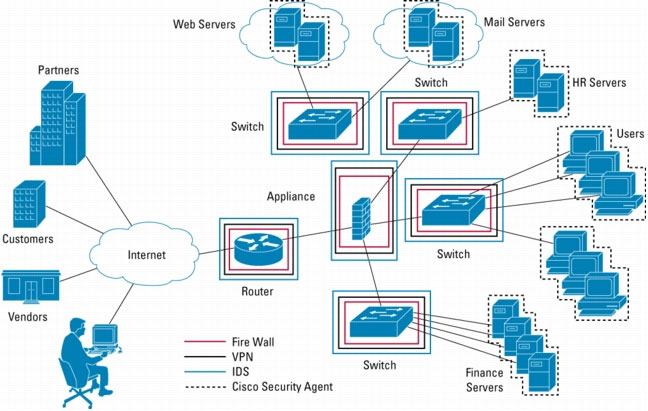 A computer network, or simply a network, is a collection of computers and other hardware components interconnected by communication channels that allow sharing of resources and information.[1] Where at least one process in one device is able to send/receive data to/from at least one process residing in a remote device, then the two devices are said to be in a network. Simply, more than one computer interconnected through a communication medium for information interchange is called a computer network.
Networks may be classified according to a wide variety of characteristics, such as the medium used to transport the data, communications protocol used, scale, topology, and organizational scope.
Communications protocols define the rules and data formats for exchanging information in a computer network, and provide the basis for network programming. Well-known communications protocols include two Ethernet, a hardware and link layer standard that is ubiquitous in local area networks, and the Internet protocol suite, which defines a set of protocols for internetworking, i.e. for data communication between multiple networks, as well as host-to-host data transfer, and application-specific data transmission formats.
Computer networking is sometimes considered a sub-discipline of electrical engineering, telecommunications, computer science, information technology or computer engineering, since it relies upon the theoretical and practical application of these disciplines.
A computer network, or simply a network, is a collection of computers and other hardware components interconnected by communication channels that allow sharing of resources and information.[1] Where at least one process in one device is able to send/receive data to/from at least one process residing in a remote device, then the two devices are said to be in a network. Simply, more than one computer interconnected through a communication medium for information interchange is called a computer network.
Networks may be classified according to a wide variety of characteristics, such as the medium used to transport the data, communications protocol used, scale, topology, and organizational scope.
Communications protocols define the rules and data formats for exchanging information in a computer network, and provide the basis for network programming. Well-known communications protocols include two Ethernet, a hardware and link layer standard that is ubiquitous in local area networks, and the Internet protocol suite, which defines a set of protocols for internetworking, i.e. for data communication between multiple networks, as well as host-to-host data transfer, and application-specific data transmission formats.
Computer networking is sometimes considered a sub-discipline of electrical engineering, telecommunications, computer science, information technology or computer engineering, since it relies upon the theoretical and practical application of these disciplines.
~wikipedia.org
Netiquette
 Netiquette /net-i-ket/, Noun: 1. The social code of network communication. 2. The social and moral code of the internet based on the human condition and Golden Rule of Netiquette. 3. A philosophy of effective internet communication that utilizes common conventions and norms as a guide for rules and standards.
Above is the dictionary netiquette definition. It defines the concept of internet etiquette and online ethics. The theory of netiquette rules is the Golden Rule of Netiquette, do unto others online as you would have done to you. The rules of netiquette are net etiquette and internet ethics rules for effective communication. The core rules of netiquette are proper netiquette applied to everyday internet use.
The internet has its own culture, Netiquette. The cyber etiquette and digital manners between users are the rules of netiquette. They are cultural norms for status updates, email messages, privacy settings, and lists. Internet users are human beings, so Netiquette is human, it takes into account the context of how information is shared. This applies the human condition to the content of the data.
The core rules of netiquette are the regulatory parameters. These are the most agreed upon rules. All other rules on this site are in their initial stages of development. Please be advised that the content of the pages has not been outlined. The site contains standards and reasons. It will be making dramatic changes in content and writing style over the next few months.
Netiquette is the social code of the internet because the internet is a network and etiquette is a social code. Internet etiquette, is centered around data and its use. The types of data are: text, audio, graphic, and video. Each website supports these types of data to some degree. Since internet use is new and increasing there are new words to accoma
Netiquette /net-i-ket/, Noun: 1. The social code of network communication. 2. The social and moral code of the internet based on the human condition and Golden Rule of Netiquette. 3. A philosophy of effective internet communication that utilizes common conventions and norms as a guide for rules and standards.
Above is the dictionary netiquette definition. It defines the concept of internet etiquette and online ethics. The theory of netiquette rules is the Golden Rule of Netiquette, do unto others online as you would have done to you. The rules of netiquette are net etiquette and internet ethics rules for effective communication. The core rules of netiquette are proper netiquette applied to everyday internet use.
The internet has its own culture, Netiquette. The cyber etiquette and digital manners between users are the rules of netiquette. They are cultural norms for status updates, email messages, privacy settings, and lists. Internet users are human beings, so Netiquette is human, it takes into account the context of how information is shared. This applies the human condition to the content of the data.
The core rules of netiquette are the regulatory parameters. These are the most agreed upon rules. All other rules on this site are in their initial stages of development. Please be advised that the content of the pages has not been outlined. The site contains standards and reasons. It will be making dramatic changes in content and writing style over the next few months.
Netiquette is the social code of the internet because the internet is a network and etiquette is a social code. Internet etiquette, is centered around data and its use. The types of data are: text, audio, graphic, and video. Each website supports these types of data to some degree. Since internet use is new and increasing there are new words to accomadate its use, cyber words. Netiquette is a cyber word. Proper netiquette is positive. Practice proper netiquette. Visit positive websites and choose online friends who share positive updates. Positive and peaceful effective communication, that's good netiquette.
~http://www.networketiquette.net/
Subscribe to:
Posts (Atom)